Audio and video submissions
Students can submit a recording. Viva transcribes it, interviews on the transcript, and shows you the original with a clickable transcript.
When a student uploads a recording (.mp3, .mp4, .m4a, .mov, .webm or .wav, up to 500 MB), Viva transcribes the audio track automatically, with timestamps. The transcript becomes the submission text: interview questions are generated from it, and grading reads it, exactly as they would an essay.
On the report, the recording plays on the left side with its transcript underneath. Clicking a line of the transcript jumps the player to that moment, and clicking an evidence quote in the report seeks the recording to where the student said it. The player stays pinned at the top while you scroll the transcript, so pause and play are always in reach. The recording loads in full before it plays, which takes a moment on a long interview. Once it has loaded, each line of the transcript is placed where it is actually spoken in the recording, and the time beside it is where it starts, so a click plays that line from its first word. Selecting text inside a turn copies it without jumping the audio. A turn marked cut off is one where Viva was interrupted; only the words she actually spoke are shown, so a short question there is the interruption, not the student ignoring her. On conversations from before mid-September 2026 the cut point is worked out from how long her audio actually played, so the last word or two may differ slightly from the recording; the chip says so when you hover it. If a recording will not play in your browser, the player offers a download instead; the file plays in any desktop player. A recording normally carries both voices. When only the student's microphone was saved, the player says so under the controls, and what Viva said is in the transcript. When nothing was saved, or the recording reached the end of its retention period, the player says which.
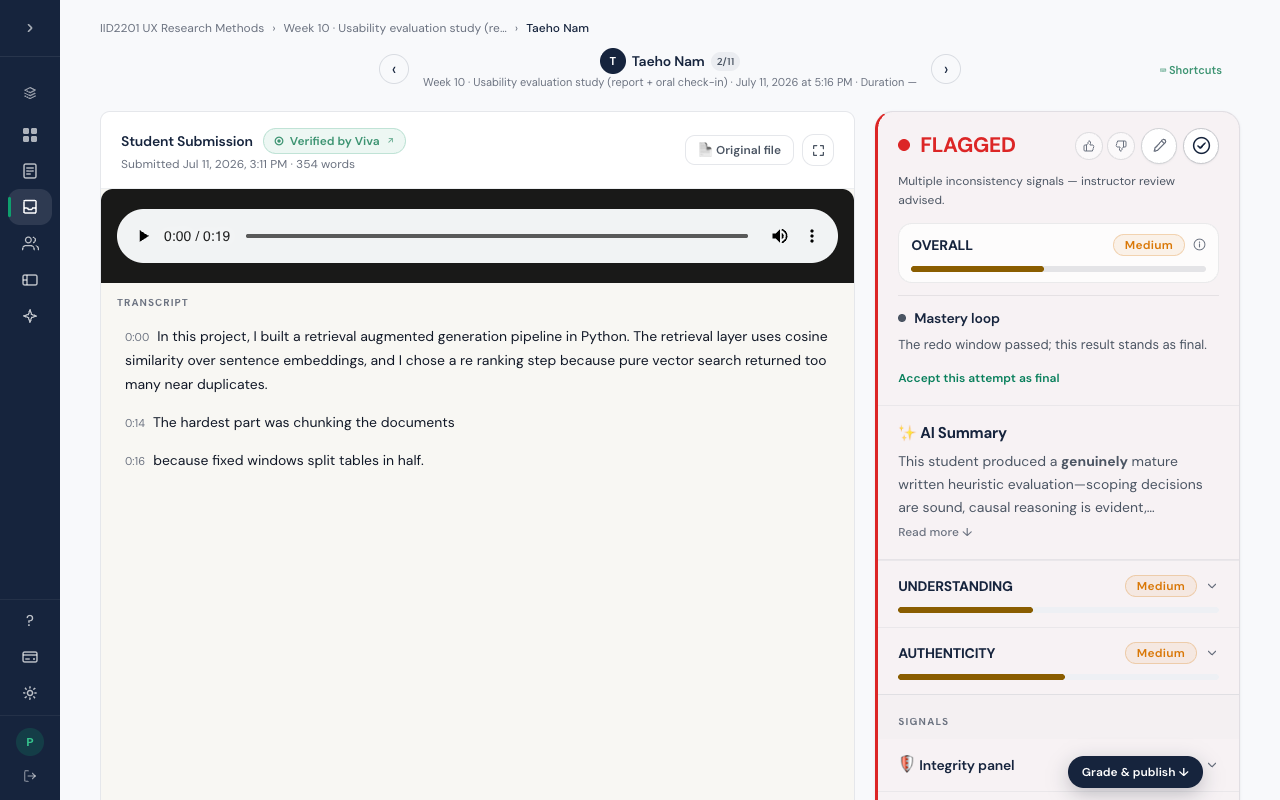
- The transcript is marked as speech, so the interview and grading treat wording and fillers as talking, not writing.
- If a second voice appears in a solo recording, the transcript labels the speakers. You will see it.
- Transcription takes a moment after submission (about a minute for a long recording), before interview questions are ready.
- For video files, a handful of snapshots of the screen are included automatically, so the interview can ask about what was shown, not only what was said. On the report they appear as a clickable filmstrip that seeks the video.
Instructors get the rest: the walkthroughs, the screenshots, and Ask Viva, which finds the right page from a typed question.